

Alpha release. The Lightbits plugin for Apache CloudStack is an alpha version meant for evaluation. It should not be used in production environments. See the alpha scope
CloudStack storage, no specialized hardware required
The Lightbits open-source plugin registers a Lightbits cluster as managed primary storage in Apache CloudStack. Every VM root disk and data disk becomes its own Lightbits volume, served to the KVM hosts over NVMe/TCP on your existing Ethernet network. Disk offerings choose the replica count per volume, snapshots and clones run natively on the storage, and running VMs live-migrate between hosts without copying their disks. Everything is driven from the standard CloudStack UI and API.
This first release is an alpha, published so CloudStack operators can evaluate the plugin in lab and proof-of-concept environments and share feedback before general availability.
What is Apache CloudStack? Apache CloudStack is an open-source Infrastructure-as-a-Service platform for building and running multi-tenant clouds of virtual machines. Service providers, enterprises and research institutions use it to offer self-service compute, networking and storage.
What are the main features of CloudStack? A web UI and REST API, multi-tenancy with domains, accounts and projects, compute and disk offerings, built-in networking, and a pluggable storage framework that supports managed primary storage from external systems.
What storage does CloudStack support? CloudStack supports NFS, local disk, iSCSI and Ceph RBD primary storage, plus managed storage plugins from storage vendors. Lightbits plugs in as managed primary storage: software-defined block storage that runs on standard servers and serves volumes over NVMe/TCP.
Is CloudStack a good alternative to VMware? Yes. Many service providers and enterprises run Apache CloudStack with KVM as an open-source alternative to VMware. Lightbits gives those clouds the shared, high-performance block storage a SAN used to provide, without Fibre Channel.
Which hypervisors does the Lightbits plugin support? KVM. The CloudStack management server talks to the Lightbits API, and each KVM host connects to its volumes over NVMe/TCP with the standard Linux nvme_tcp module.
Add Storage to CloudStack
Two paths, one clean abstraction.
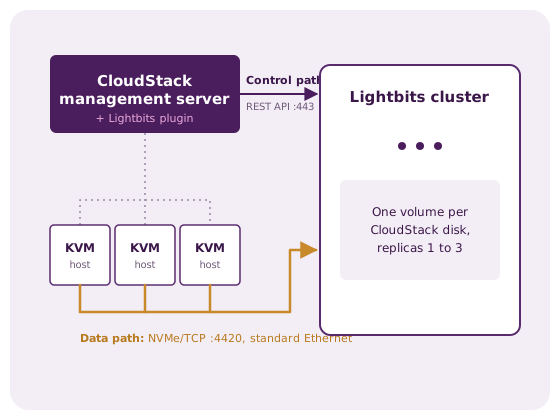
The plugin connects CloudStack’s managed primary storage framework to the Lightbits cluster over two independent channels: a REST API for volume lifecycle and NVMe/TCP for I/O. Each CloudStack volume maps one-to-one to a Lightbits volume.
- Control path: the CloudStack management server calls the Lightbits REST API to create and delete volumes, take snapshots and clones, grant each host access to its volumes, and report capacity. Each storage pool authenticates with a token scoped to its own Lightbits project.
- Data path: KVM hosts connect to their volumes over NVMe/TCP and hand the block device straight to the VM. Nothing is installed on the Lightbits side.
CloudStack storage. Zero specialized hardware.

High Performance Block Storage

Managed Primary Storage

Live Migration

Native Snapshots and Clones

Replicas Per Volume
Open Source
What this alpha is, and what it is not yet
The alpha covers the core VM storage lifecycle on KVM and has passed repeated end-to-end test runs in Lightbits labs. It has not yet completed the security, hardening and packaging work Lightbits requires before supporting the plugin in production.
Before you install
- This is an alpha version meant for evaluation. It should not be used in production environments or on clusters that hold production data.
- This version does not verify the Lightbits cluster’s TLS certificate. The connection is encrypted, but run the alpha on an isolated lab or evaluation network. Certificate verification will be added in a future version.
- Configuration options and behavior may change between alpha releases.
- Use a dedicated Lightbits project for each CloudStack storage pool so evaluation activity stays separate from anything else on the cluster.
Working in this alpha Validated in lab
- Lightbits as managed primary storage, cluster-wide or zone-wide
- VM root disks created from templates as native clones
- Data disks: create, attach, detach, delete
- Volume snapshots: take, revert, delete, create volume from snapshot
- Volume resize (grow) while the VM is stopped
- Replica count per volume through disk offerings, compression and QoS policy per pool
- Live migration of running VMs and host maintenance evacuation
- A separate Lightbits project and token per storage pool
Coming in future versions Planned
- TLS certificate verification, on by default
- Per-volume usage statistics in the CloudStack UI
- Resize of disks attached to running VMs (needs a change in CloudStack itself)
- Mapping of CloudStack domains, accounts and projects to Lightbits projects
- Signed release packages and a supported upgrade path
Add Lightbits to a CloudStack Evaluation Cloud
Adding Lightbits as CloudStack primary storage and deploying a VM on NVMe/TCP is as easy as 1-2-3.
Install the plugin
Run the installer on the CloudStack management server and on each KVM host. It places the plugin, checks the NVMe/TCP prerequisites on KVM hosts and restarts the CloudStack services.
Register the primary storage
Add primary storage with provider “Lightbits”, pointing at the cluster’s API address and a project token. CloudStack validates the cluster and shows its capacity.
Create an offering and deploy
Tag a disk or compute offering to the pool, optionally set the replica count, and deploy VMs. Their disks are created on Lightbits and connected over NVMe/TCP.
See it in action
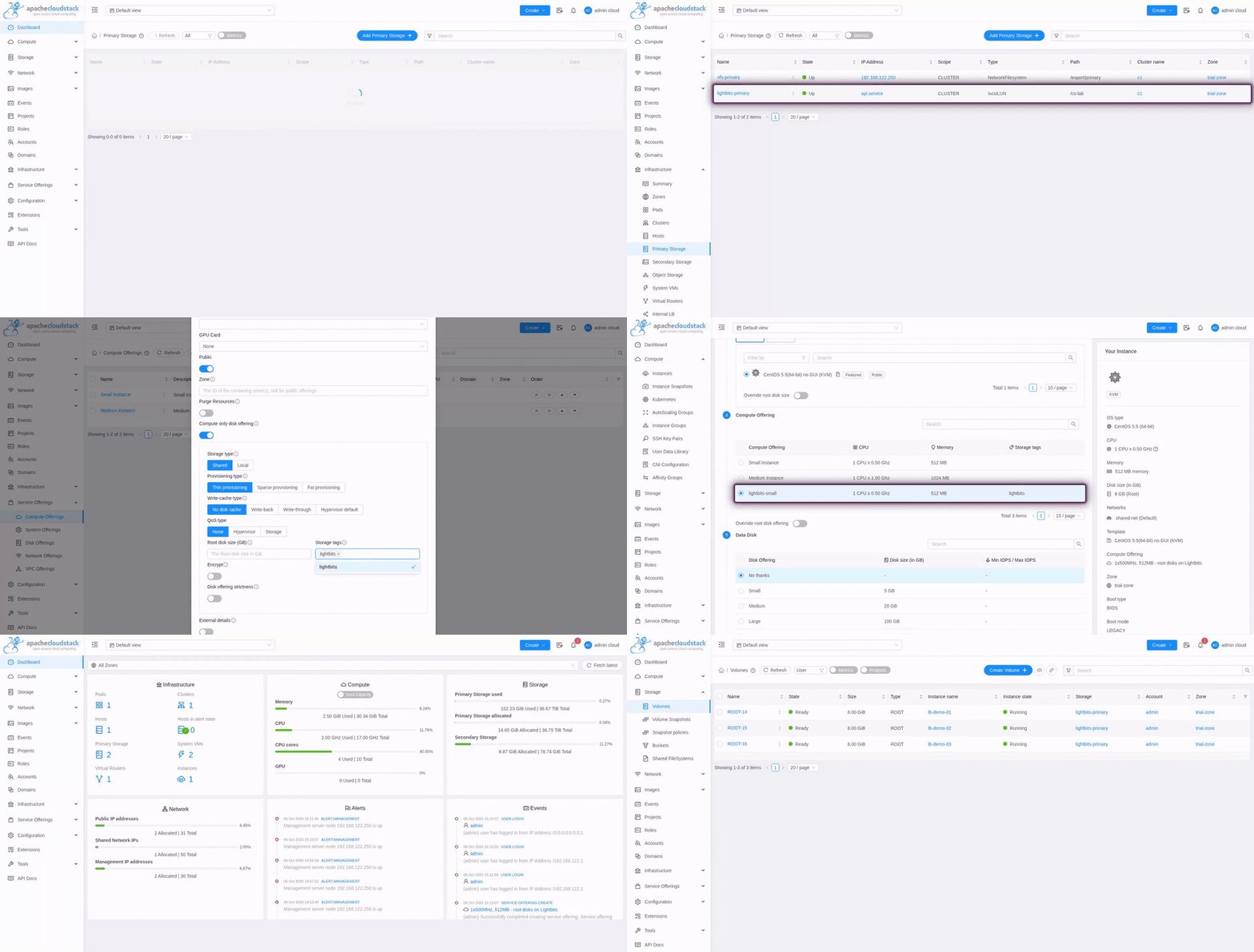
Register the pool, create an offering, deploy VMs. The root disks are native Lightbits clones.
Live migration, without moving the data
When CloudStack migrates a running VM to another KVM host, its disks stay where they are on the Lightbits cluster. The plugin gives the destination host access to each volume, the VM continues on the new host, and the old host’s access is removed. The demo below shows an application VM streaming video and writing a transaction log while it migrates, then a host put into maintenance with all its VMs moved off live.
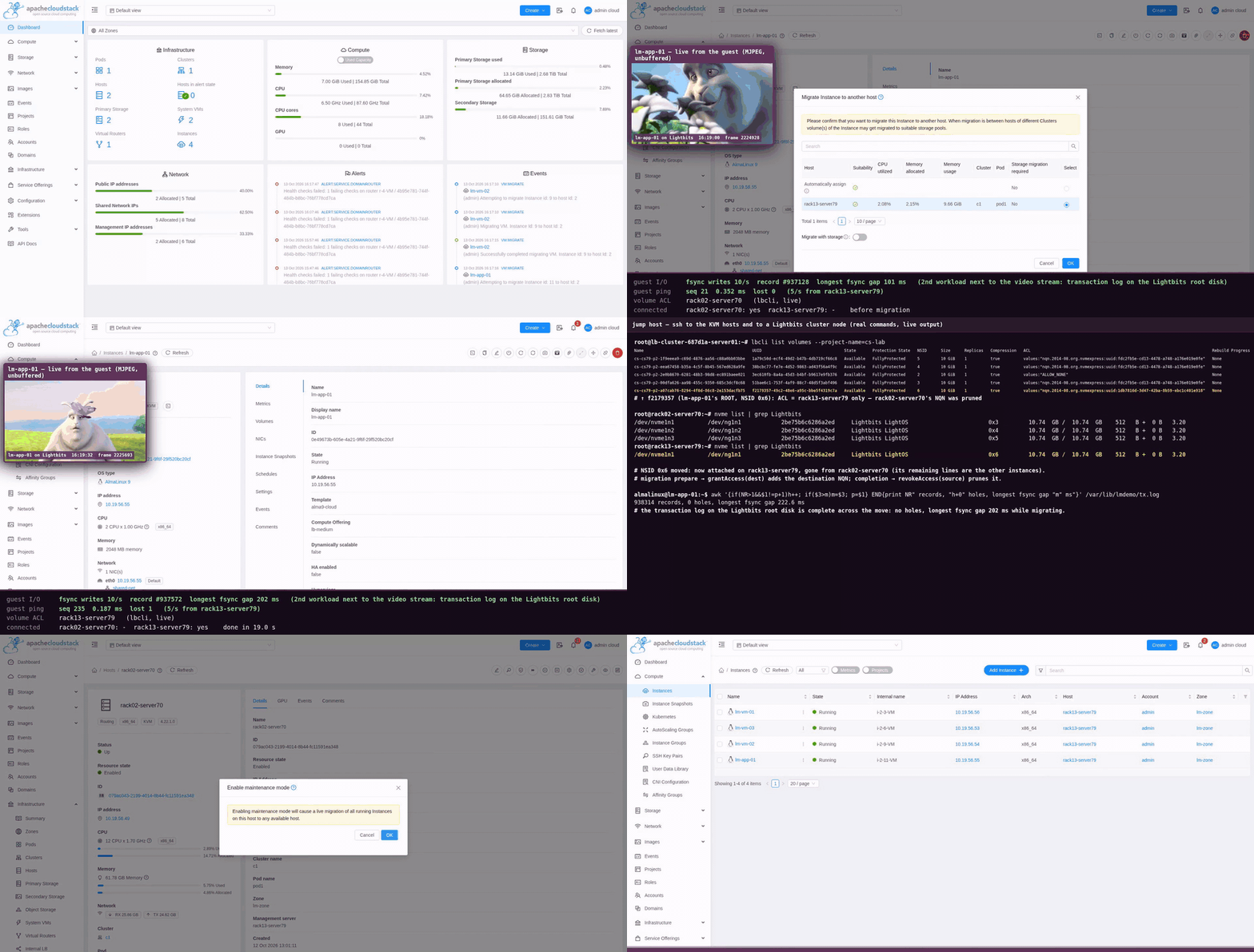
The VM keeps running through the move. Its disk stays on Lightbits; only host access changes.
Tested versions for this alpha
Lightbits tests the alpha against the combinations below. Other versions may work but have not been tested.
| Component | Version | Status |
|---|---|---|
| Apache CloudStack | 4.22 (tested on 4.22.1.0) | Alpha |
| Hypervisor | KVM | Alpha |
| Lightbits | 3.x (tested on 3.19 and 3.20) | Alpha |
| KVM host | Linux with the nvme_tcp module and nvme-cli | Required |
| NVMe-oF transport | TCP (standard Ethernet) | ✓ Supported |
| Production use | Any | Not supported in alpha |
Ready to evaluate NVMe/TCP storage in your CloudStack cloud?
Tell us about your CloudStack environment and we will help you set up the alpha plugin in a lab or proof-of-concept environment.
Apache, Apache CloudStack, CloudStack and the Apache CloudStack logo are trademarks of The Apache Software Foundation. Their use does not imply endorsement by The Apache Software Foundation.