

Earlier this month I checked into a hotel, tapped my keycard, and had a small epiphany in the elevator. That card opened exactly one room, for exactly three nights, and on checkout morning it quietly stopped working. Nobody had to chase me for the key. (I did, however, have to chase the elevator, which had opinions about my floor.)
That little plastic card is the whole philosophy of Privileged Access Management (PAM) in your pocket: the right access, for the right person, for the right amount of time, and not a minute longer. Forward-thinking security teams have been applying that idea to servers, databases, and cloud consoles for years. Today I want to show how naturally it extends to the storage layer, and how Lightbits software-defined storage (SDS) makes it beautifully simple using OpenID Connect (OIDC), the identity protocol most of your stack already speaks.
Let’s walk through how it works, the integration patterns that make it sing, and why your auditors (and your sleep schedule) will thank you.
1. How Lightbits federated authentication works
Lightbits federated authentication lets your existing identity provider (IdP), the system that already knows who your people are, sign them into the Lightbits management plane. Lightbits supports Active Directory Federation Services (ADFS) and Okta as IdPs, using OAuth 2.0 and OIDC under the hood. You don’t need to create, sync, or remember to delete any local storage accounts.
Here’s the flow in plain words:
- An admin runs lbcli login, the Lightbits command-line tool.
- Lightbits returns a short URL and code; the user signs in to the IdP in a browser, and the IdP issues a JSON Web Token (JWT), a signed digital pass that says who you are and which groups you belong to.
- Every lbcli command carries that token. The cluster verifies it and maps the user’s groups to a Lightbits role through a simple authorization map.
That authorization map is where the magic happens. Each entry ties an IdP group to a Lightbits role, such as a global system:cluster-admin or a project-specific admin (acting as your volume administrator), alongside a defined scope. Thanks to Lightbits multi-tenancy, that scope can be the whole cluster or a single project, so each tenant team sees and manages only its own volumes. This is role-based access control (RBAC), and it’s precise.
Automation is covered too. With ADFS, scripts and applications use the OAuth 2.0 client credentials flow to fetch a token and call the Lightbits REST API directly, with roles mapped to their client IDs. People and pipelines, one consistent model.
2. Where PAM fits: four patterns that click
Because Lightbits grants roles based on IdP group membership, any PAM platform that governs those groups can steer access to your storage. Platforms such as CyberArk, BeyondTrust, Delinea, and Okta’s own privileged access and governance tools all speak this language. Here are the four patterns I find most compelling.
Pattern A: Just-in-time elevation
This is the hotel keycard. An engineer requests storage admin rights in the PAM tool, with a reason and a time window. Once approved, the PAM tool adds them to the mapped group for, say, two hours. Their next lbcli login brings a token carrying that group, and Lightbits grants the matching role. When the window closes, the PAM tool removes the membership and the role simply isn’t there on the next login.
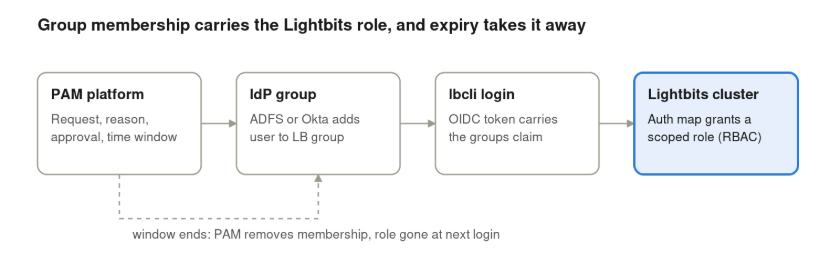
Okta, for example, offers time-bound access requests that automatically revoke group membership, and BeyondTrust offers just-in-time access policies with approval workflows. Lightbits brings the precise, scoped roles at the other end.
Pattern B: Brokered and recorded sessions
Many teams run lbcli from a hardened admin jump host. Put that host behind your PAM tool’s session manager, and every storage admin session is brokered, recorded, and searchable. Pair it with federated sign-in and you know who connected, what they were allowed to do, and what they actually did.
Pattern C: Vaulted credentials for automation
Your pipelines deserve the same care as your people. In ADFS app mode, the client secret or certificate a script uses to fetch its token lives in the PAM vault, which rotates it on schedule. Your provisioning automation keeps humming along at Lightbits speed, with no secrets tucked into config files.
Pattern D: Governed break-glass access
Every well-run environment keeps an emergency key. Lightbits provides a system-scope JWT for full cluster administration. Store it in the PAM vault, require approval to check it out, and record every use. Your break-glass key stays powerful, available, and fully accountable.
3. Why it matters for the whole organization
This is where the integration earns its keep, well beyond the storage team.
- Zero standing privilege. Admin rights exist only while a request is approved, so the window for misuse shrinks from “always” to “two hours on Tuesday.”
- One identity everywhere. Joiners, movers, and leavers are handled once, in the IdP. Lightbits inherits multi-factor authentication (MFA) and conditional access policies straight from your IdP.
- Least privilege that scales with tenants. Project-scoped roles map neatly to team groups, so application teams can self-serve their own volumes while platform admins keep the cluster-wide keys.
- Audit evidence on tap. Approvals live in the PAM tool, sign-ins in the IdP, and storage actions in Lightbits events, which log streaming can send to your security information and event management (SIEM) platform. That joined-up trail is exactly what frameworks like SOX, PCI DSS, ISO 27001, NIS2, and DORA ask for.
- Fewer credentials in the wild. Short-lived, IdP-issued tokens and vaulted secrets replace long-lived tokens on laptops and in scripts.
- One security story. Storage joins the same zero-trust controls you already apply to servers, cloud, and databases, so security reviews get shorter and friendlier.
And the best part: none of this touches the data path. Your workloads keep enjoying the consistent sub-millisecond latency of Non-Volatile Memory Express over Transmission Control Protocol, better known as NVMe over TCP (a protocol Lightbits invented), while governance happens quietly on the management plane.
4. Getting it right: five best practices
The setup is refreshingly quick: three lbcli objects and one enable command. These habits make it shine from day one.
- Keep privileged tokens short-lived. Your IdP sets the token lifetime (Okta’s default is one hour). For privileged groups, shorter is sweeter, because a role change takes effect at the next login.
- Retire legacy tokens as part of rollout. Once federated sign-in is live, inventory any Lightbits-issued JWTs, move the ones you keep into the PAM vault, and retire the rest. The operational best practices guide is a great companion here.
- Name groups deliberately. Authorization map entries match group names exactly, so a clear convention like LB-<project>-<role> keeps mappings readable and reviewable.
- Pair the management plane with data-path controls. Federation governs who manages the cluster. Host access control lists (ACLs) and NVMe/TCP in-band authentication govern which hosts reach which volumes. Together they give you defense in depth.
- Stream everything to one place. Send Lightbits events alongside your PAM and IdP logs so investigations and audits read like a single story.
The keycard, upgraded
PAM gives you the right access for the right time. Lightbits gives you federated OIDC sign-in, precise project-scoped roles, and an authorization map your PAM platform can steer with nothing more than group membership. Put them together and storage becomes one of the best-governed layers in your stack, without giving up an ounce of performance.
Curious how it would look in your environment? Talk to a Lightbits expert and we’ll map it out together.
Access when you need it, gone when you don’t. Now that’s a keycard worth keeping.